oracle 10.2.0.4升级到11.2.0.4(单实例)
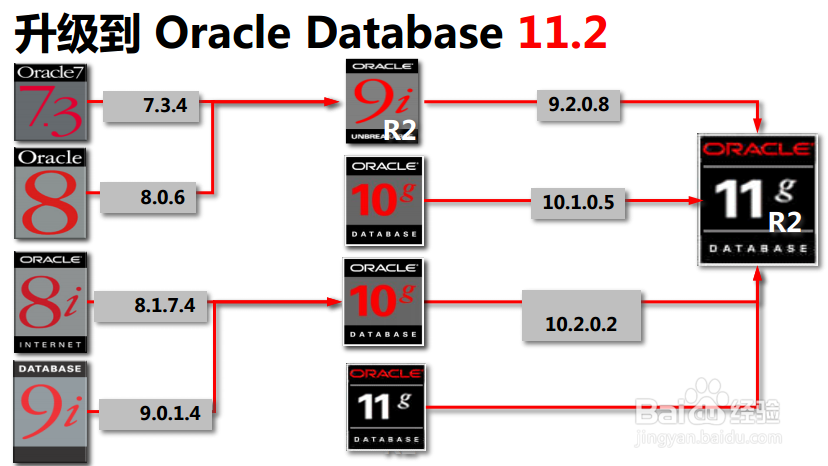
1、可以确定10.2.0.4 可以直接升级到 11.2.0.4
1、1:DBUA 图形界面
2:GUI 手动升级
1、Backup the database.
2、In UNIX/Linux environments, set the $ORACLE_HOME and $PATH variables to point to the new 11g Oracle home.
3、Analyze the existing instance using the "$ORACLE_HOME/rdbms/admin/utlu111i.sql" script, explained below.
4、Start the original database using the STARTUP UPGRADE command and proceed with the upgrade by running the "$ORACLE_HOME/rdbms/admin/catupgrd.sql" script.
5、Recompile invalid objects.
Restart the database.
6、Run the "$ORACLE_HOME/rdbms/admin/utlu111s.sql" script and check the result of the upgrade.
7、Troubleshoot any issues or abort the upgrade.
3:expdp/impdp 最简单,风险性最小,时间较长
如果要减少时间可以考虑 2个库都关闭归档,开启并行
1、服务器B 编辑oracle环境
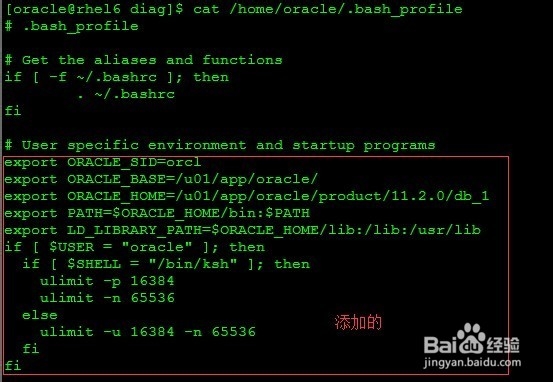
[oracle@rhel6 diag]$ cat /home/oracle/.bash_profile
# .bash_profile
# Get the aliases and functions
if [ -f ~/.bashrc ]; then
. ~/.bashrc
fi
# User specific environment and startup programs
export ORACLE_SID=orcl
export ORACLE_BASE=/u01/app/oracle/
export ORACLE_HOME=/u01/app/oracle/product/11.2.0/db_1
export PATH=$ORACLE_HOME/bin:$PATH
export LD_LIBRARY_PATH=$ORACLE_HOME/lib:/lib:/usr/lib
if [ $USER = "oracle" ]; then
if [ $SHELL = "/bin/ksh" ]; then
ulimit -p 16384
ulimit -n 65536
else
ulimit -u 16384 -n 65536
fi
fi
注意:
1:ORACLE_SID 可以可原库不同
2:编辑完之后执行 source /home/oracle/.bash_profile 使编译环境生效
3:执行完之后验证是否生效
[oracle@rhel6 diag]$ echo $ORACLE_BASE
/u01/app/oracle/
[oracle@rhel6 diag]$ echo $ORACLE_SID
orcl
[oracle@rhel6 diag]$ echo $ORACLE_HOME
/u01/app/oracle/product/11.2.0/db_1
2、服务器B 创建目录
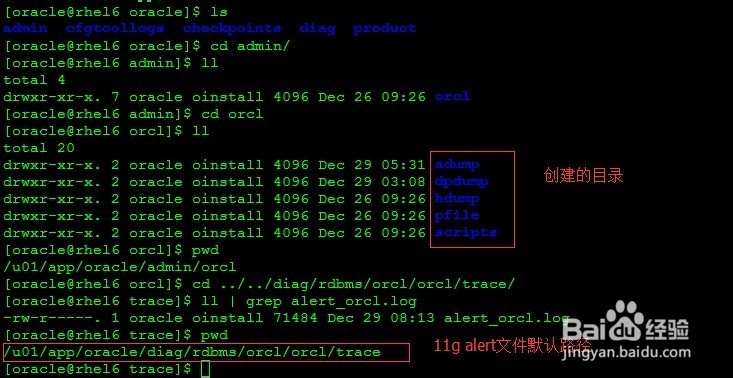
mkdir -p $ORACLE_BASE/admin/$ORACLE_SID/adump
mkdir -p $ORACLE_BASE/admin/$ORACLE_SID/dpdump
mkdir -p $ORACLE_BASE/admin/$ORACLE_SID/hdump
mkdir -p $ORACLE_BASE/admin/$ORACLE_SID/pfile
mkdir -p $ORACLE_BASE/admin/$ORACLE_SID/scripts
注意:Oracle 11g alert文件存放在$ORACLE_BASE/diag/rdbms/$ORACLE_SID中
3、将服务器B 11.2.0.4的utlu112i.sql,scp到源主机上,进行升级检查
[oracle@rhel6 admin]$ scp /u01/app/oracle/product/11.2.0/db_1/rdbms/admin/utlu112i.sql 192.168.56.125:/home/oracle 服务器B上传脚本到服务器A
服务器A 10.2.0.4 执行:
[oracle@oracle10g oracle]$ sqlplus / as sysdba
SQL*Plus: Release 10.2.0.4.0 - Production on Fri Dec 26 06:46:46 2014
Copyright (c) 1982, 2007, Oracle. All Rights Reserved.
Connected to:
Oracle Database 10g Enterprise Edition Release 10.2.0.4.0 - 64bit Production
With the Partitioning, OLAP, Data Mining and Real Application Testing options
SQL> spool upgrade.info
SQL> @/home/oracle/utlu112i.sql
Oracle Database 11.2 Pre-Upgrade Information Tool 12-26-2014 06:47:55
Script Version: 11.2.0.4.0 Build: 001
.
**********************************************************************
Database:
**********************************************************************
--> name: ORCL
--> version: 10.2.0.4.0
--> compatible: 10.2.0.3.0
--> blocksize: 8192
--> platform: Linux x86 64-bit
--> timezone file: V4
.
**********************************************************************
Tablespaces: [make adjustments in the current environment]
**********************************************************************
--> SYSTEM tablespace is adequate for the upgrade.
.... minimum required size: 549 MB
--> UNDOTBS1 tablespace is adequate for the upgrade.
.... minimum required size: 400 MB
--> SYSAUX tablespace is adequate for the upgrade.
.... minimum required size: 260 MB
--> TEMP tablespace is adequate for the upgrade.
.... minimum required size: 60 MB
.
**********************************************************************
Flashback: OFF
**********************************************************************
**********************************************************************
Update Parameters: [Update Oracle Database 11.2 init.ora or spfile]
Note: Pre-upgrade tool was run on a lower version 64-bit database.
**********************************************************************
--> If Target Oracle is 32-Bit, refer here for Update Parameters:
WARNING: --> "sga_target" needs to be increased to at least 412 MB
WARNING: --> "pga_aggregate_target" needs to be increased to at least 24 MB
.
--> If Target Oracle is 64-Bit, refer here for Update Parameters:
WARNING: --> "sga_target" needs to be increased to at least 596 MB
WARNING: --> "pga_aggregate_target" needs to be increased to at least 24 MB
.
**********************************************************************
Renamed Parameters: [Update Oracle Database 11.2 init.ora or spfile]
**********************************************************************
-- No renamed parameters found. No changes are required.
.
**********************************************************************
Obsolete/Deprecated Parameters: [Update Oracle Database 11.2 init.ora or spfile]
**********************************************************************
--> background_dump_dest 11.1 DEPRECATED replaced by "diagnostic_dest"
--> user_dump_dest 11.1 DEPRECATED replaced by "diagnostic_dest"
.
**********************************************************************
Components: [The following database components will be upgraded or installed]
**********************************************************************
--> Oracle Catalog Views [upgrade] VALID
--> Oracle Packages and Types [upgrade] VALID
--> Oracle Workspace Manager [upgrade] VALID
.
**********************************************************************
Miscellaneous Warnings
**********************************************************************
WARNING: --> Database is using a timezone file older than version 14.
.... After the release migration, it is recommended that DBMS_DST package
.... be used to upgrade the 10.2.0.4.0 database timezone version
.... to the latest version which comes with the new release.
WARNING: --> Database contains INVALID objects prior to upgrade.
.... The list of invalid SYS/SYSTEM objects was written to
.... registry$sys_inv_objs.
.... The list of non-SYS/SYSTEM objects was written to
.... registry$nonsys_inv_objs.
.... Use utluiobj.sql after the upgrade to identify any new invalid
.... objects due to the upgrade.
.... USER ZXX has 3 INVALID objects.
WARNING: --> Your recycle bin contains 1 object(s).
.... It is REQUIRED that the recycle bin is empty prior to upgrading
.... your database. The command:
PURGE DBA_RECYCLEBIN
.... must be executed immediately prior to executing your upgrade.
.
**********************************************************************
Recommendations
**********************************************************************
Oracle recommends gathering dictionary statistics prior to
upgrading the database.
To gather dictionary statistics execute the following command
while connected as SYSDBA:
EXECUTE dbms_stats.gather_dictionary_stats;
**********************************************************************
Oracle recommends reviewing any defined events prior to upgrading.
To view existing non-default events execute the following commands
while connected AS SYSDBA:
Events:
SELECT (translate(value,chr(13)||chr(10),' ')) FROM sys.v$parameter2
WHERE UPPER(name) ='EVENT' AND isdefault='FALSE'
Trace Events:
SELECT (translate(value,chr(13)||chr(10),' ')) from sys.v$parameter2
WHERE UPPER(name) = '_TRACE_EVENTS' AND isdefault='FALSE'
Changes will need to be made in the init.ora or spfile.
**********************************************************************
根据检查脚本情况:
1:表空间对比满足条件
select file_name,tablespace_name,maxbytes/1024/1024 from dba_data_files
where tablespace_name in('SYSTEM','UNDOTBS1','SYSAUX')
union all
select file_name,tablespace_name,maxbytes/1024/1024 from dba_temp_files
2:服务器A创建pfile文件
SQL> create pfile='/home/oracle/orcl10.pfile' from spfile;
3:scp pfile文件到服务器B上
[oracle@oracle10g ~]$ scp /home/oracle/orcl10.pfile 192.168.56.127:/u01/upgrade
oracle@192.168.56.127's password:
orcl10.pfile 100% 917 0.9KB/s 00:00
4:服务器B上编辑pfile文件
由于平台是64位数
将
*.sga_target=629145600
*.ga_aggregate_target=25165824
将*.background_dump_dest和*.user_dump_dest 删除
diagnostic_dest= ORACLE_BASE
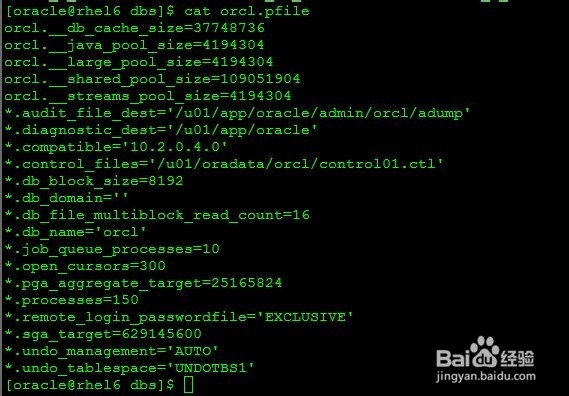
[oracle@rhel6 upgrade]$ cp orcl10.pfile /u01/app/oracle/product/11.2.0/db_1/dbs/orcl.pfile
[oracle@rhel6 dbs]$ cat initorcl.ora
orcl.__db_cache_size=37748736
orcl.__java_pool_size=4194304
orcl.__large_pool_size=4194304
orcl.__shared_pool_size=109051904
orcl.__streams_pool_size=4194304
*.audit_file_dest='/u01/app/oracle/admin/orcl/adump'
*.diagnostic_dest='/u01/app/oracle'
*.compatible='10.2.0.4.0'
*.control_files='/u01/oradata/orcl/control01.ctl'
*.db_block_size=8192
*.db_domain=''
*.db_file_multiblock_read_count=16
*.db_name='orcl'
*.job_queue_processes=10
*.open_cursors=300
*.pga_aggregate_target=25165824
*.processes=150
*.remote_login_passwordfile='EXCLUSIVE'
*.sga_target=629145600
*.undo_management='AUTO'
*.undo_tablespace='UNDOTBS1'
5:服务器A运行utlrp.sql 脚本,重新编译无效对象
重新编译SYS 和SYSTEM 中的无效对象
记录无效对象:
SQL> col OWNER for a5;
SQL> col OBJECT_NAME for a30;
SQL> col OBJECT_TYPE for a10;
SQL> select * from registry$nonsys_inv_objs;
OWNER OBJECT_NAME OBJECT_TYP
----- ------------------------------ ----------
ZXX JOB_PROC_WFXXSB_ZTTJ PROCEDURE
ZXX VIEW_DLJK_MAXCLXXBH VIEW
ZXX VIEW_DLJK_TXJKD VIEW
SQL> select * from registry$sys_inv_objs; sys/system的失效对象
no rows selected
SQL> @?/rdbms/admin/utlrp.sql;
重新执行 @/home/oracle/utlu112i.sql,查看是否重新编译
6:服务器A执行PURGE DBA_RECYCLEBIN
SQL> PURGE DBA_RECYCLEBIN;
DBA Recyclebin purged.
7:服务器A收集系统信息EXECUTE dbms_stats.gather_dictionary_stats;
在升级前创建字典统计信息—
否则预升级工具( utlu102i.sql)会花费更长时间
SQL> EXECUTE dbms_stats.gather_dictionary_stats;
PL/SQL procedure successfully completed.
注意:升级之后执行utluiobj.sql
4、服务器netca创建监听
5、备份原数据库
1:全库备份
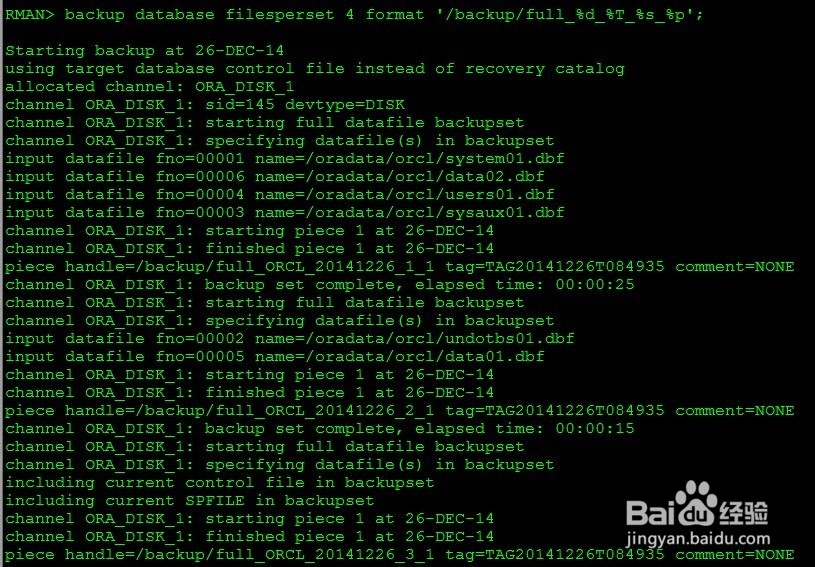
backup database filesperset 4 format '/backup/full_%d_%T_%s_%p';
2:切换日志
sql 'alter system archive log current';
3:归档备份
backup archivelog all format '/backup/arch_%d_%T_%s_%p' delete input;
4:控制文件备份
backup current controlfile format '/backup/ctl_%d_%T_%s_%p';
5:上传服务器B 备份文件
RMAN> backup database filesperset 4 format '/backup/full_%d_%T_%s_%p';
Starting backup at 26-DEC-14
using target database control file instead of recovery catalog
allocated channel: ORA_DISK_1
channel ORA_DISK_1: sid=145 devtype=DISK
channel ORA_DISK_1: starting full datafile backupset
channel ORA_DISK_1: specifying datafile(s) in backupset
input datafile fno=00001 name=/oradata/orcl/system01.dbf
input datafile fno=00006 name=/oradata/orcl/data02.dbf
input datafile fno=00004 name=/oradata/orcl/users01.dbf
input datafile fno=00003 name=/oradata/orcl/sysaux01.dbf
channel ORA_DISK_1: starting piece 1 at 26-DEC-14
channel ORA_DISK_1: finished piece 1 at 26-DEC-14
piece handle=/backup/full_ORCL_20141226_1_1 tag=TAG20141226T084935 comment=NONE
channel ORA_DISK_1: backup set complete, elapsed time: 00:00:25
channel ORA_DISK_1: starting full datafile backupset
channel ORA_DISK_1: specifying datafile(s) in backupset
input datafile fno=00002 name=/oradata/orcl/undotbs01.dbf
input datafile fno=00005 name=/oradata/orcl/data01.dbf
channel ORA_DISK_1: starting piece 1 at 26-DEC-14
channel ORA_DISK_1: finished piece 1 at 26-DEC-14
piece handle=/backup/full_ORCL_20141226_2_1 tag=TAG20141226T084935 comment=NONE
channel ORA_DISK_1: backup set complete, elapsed time: 00:00:15
channel ORA_DISK_1: starting full datafile backupset
channel ORA_DISK_1: specifying datafile(s) in backupset
including current control file in backupset
including current SPFILE in backupset
channel ORA_DISK_1: starting piece 1 at 26-DEC-14
channel ORA_DISK_1: finished piece 1 at 26-DEC-14
piece handle=/backup/full_ORCL_20141226_3_1 tag=TAG20141226T084935 comment=NONE
channel ORA_DISK_1: backup set complete, elapsed time: 00:00:03
Finished backup at 26-DEC-14
RMAN> sql 'alter system archive log current';
sql statement: alter system archive log current
RMAN> sql 'alter system archive log current';
sql statement: alter system archive log current
RMAN> sql 'alter system archive log current';
sql statement: alter system archive log current
RMAN>
RMAN> backup archivelog all format '/backup/arch_%d_%T_%s_%p' delete input;
Starting backup at 26-DEC-14
current log archived
using channel ORA_DISK_1
channel ORA_DISK_1: starting archive log backupset
channel ORA_DISK_1: specifying archive log(s) in backup set
input archive log thread=1 sequence=31 recid=1 stamp=867287729
input archive log thread=1 sequence=32 recid=2 stamp=867315082
input archive log thread=1 sequence=33 recid=3 stamp=867315088
input archive log thread=1 sequence=34 recid=4 stamp=867315091
input archive log thread=1 sequence=35 recid=5 stamp=867315115
channel ORA_DISK_1: starting piece 1 at 26-DEC-14
channel ORA_DISK_1: finished piece 1 at 26-DEC-14
piece handle=/backup/arch_ORCL_20141226_4_1 tag=TAG20141226T085155 comment=NONE
channel ORA_DISK_1: backup set complete, elapsed time: 00:00:08
channel ORA_DISK_1: deleting archive log(s)
archive log filename=/u01/app/oracle/product/10.2.0/db_1/dbs/arch1_31_862000533.dbf recid=1 stamp=867287729
archive log filename=/u01/app/oracle/product/10.2.0/db_1/dbs/arch1_32_862000533.dbf recid=2 stamp=867315082
archive log filename=/u01/app/oracle/product/10.2.0/db_1/dbs/arch1_33_862000533.dbf recid=3 stamp=867315088
archive log filename=/u01/app/oracle/product/10.2.0/db_1/dbs/arch1_34_862000533.dbf recid=4 stamp=867315091
archive log filename=/u01/app/oracle/product/10.2.0/db_1/dbs/arch1_35_862000533.dbf recid=5 stamp=867315115
Finished backup at 26-DEC-14
backup current controlfile format '/backup/ctl_%d_%T_%s_%p';
RMAN> backup current controlfile format '/backup/ctl_%d_%T_%s_%p';
Starting backup at 26-DEC-14
using channel ORA_DISK_1
channel ORA_DISK_1: starting full datafile backupset
channel ORA_DISK_1: specifying datafile(s) in backupset
including current control file in backupset
channel ORA_DISK_1: starting piece 1 at 26-DEC-14
channel ORA_DISK_1: finished piece 1 at 26-DEC-14
piece handle=/backup/ctl_ORCL_20141226_6_1 tag=TAG20141226T085305 comment=NONE
channel ORA_DISK_1: backup set complete, elapsed time: 00:00:03
Finished backup at 26-DEC-14
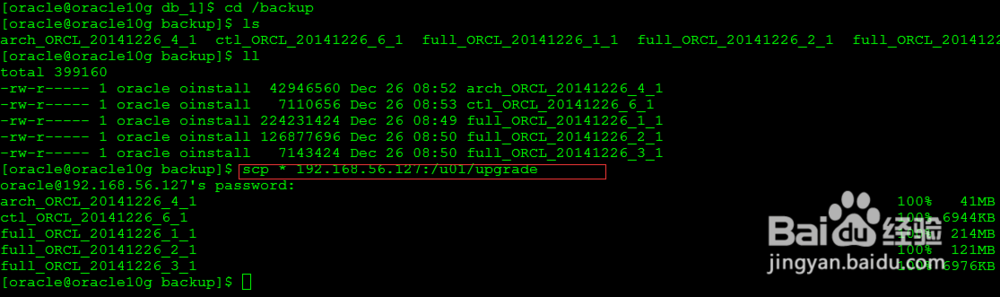
备份之后上传 到服务器B /u01/upgrade 目录中
6、恢复数据库
1:创建密码文件
2:启动到nomount状态
3:还原控制文件
4:启动到mount状态
5:如果备份文件目录已经修改需要修改控制文件信息
6:还原数据文件
7:恢复数据文件
8:修改日志文件路径
9:创建临时文件
1:创建密码文件
[oracle@rhel6 dbs]$ orapwd file=$ORACLE_HOME/dbs/orapworcl password=oracle force=y entries=5
[oracle@rhel6 dbs]$ ls
init.ora orcl.pfile orapworcl
2:启动到nomount状态
SQL> startup nomount pfile=/u01/app/oracle/product/11.2.0/db_1/dbs/orcl.pfile
3:还原控制文件
RMAN> restore controlfile from '/u01/upgrade/ctl_ORCL_20141226_6_1';
Starting restore at 26-DEC-14
using channel ORA_DISK_1
channel ORA_DISK_1: restoring control file
channel ORA_DISK_1: restore complete, elapsed time: 00:00:01
output file name=/u01/oradata/orcl/control01.ctl
Finished restore at 26-DEC-14
4:启动到mount状态
SQL> alter database mount;
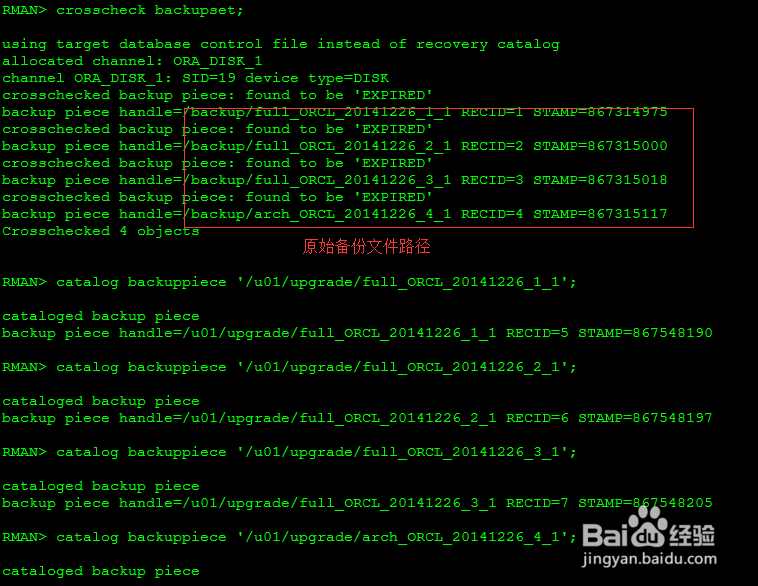
5:如果备份文件目录已经修改需要修改控制文件信息
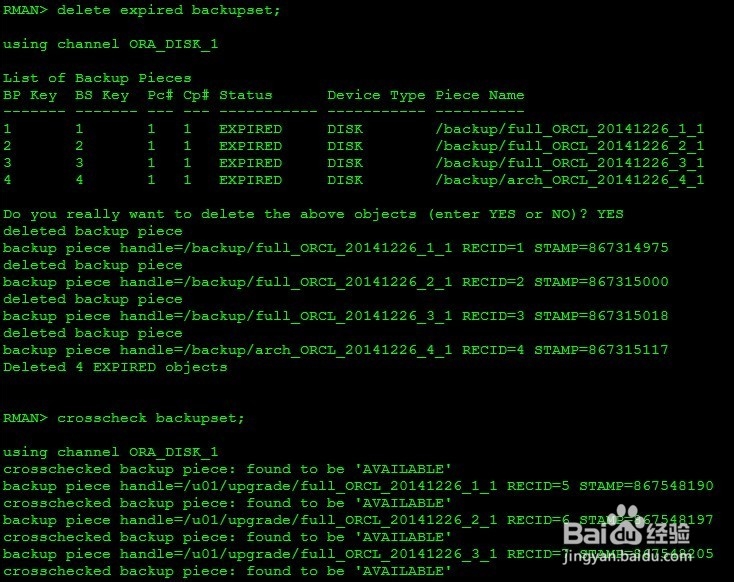
1、crosscheck backupset;
2、更改备份集路径
catalog backuppiece '/u01/upgrade/full_ORCL_20141226_1_1';
catalog backuppiece '/u01/upgrade/full_ORCL_20141226_2_1';
catalog backuppiece '/u01/upgrade/full_ORCL_20141226_3_1';
catalog backuppiece '/u01/upgrade/arch_ORCL_20141226_4_1';
3、删除失效路径
RMAN> delete expired backupset;
4、crosscheck backupset; 检查是否更改成功
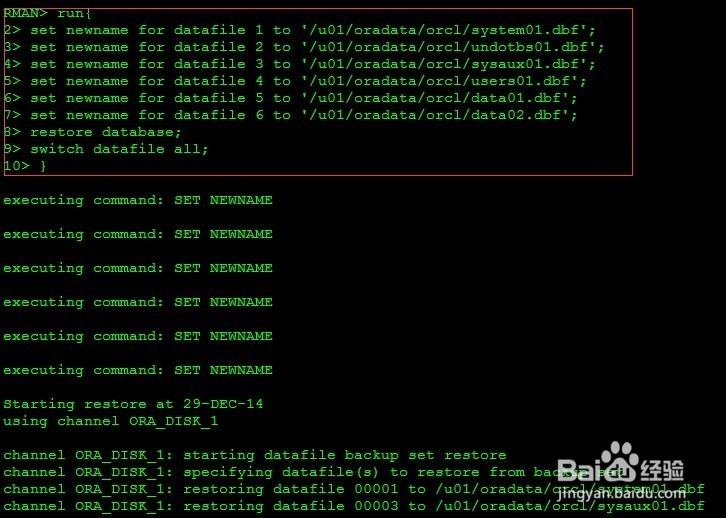
6:还原数据文件
如果数据文件存放目录已经更改,需要重命名还原。
run{
set newname for datafile 1 to '/u01/oradata/orcl/system01.dbf';
set newname for datafile 2 to '/u01/oradata/orcl/undotbs01.dbf';
set newname for datafile 3 to '/u01/oradata/orcl/sysaux01.dbf';
set newname for datafile 4 to '/u01/oradata/orcl/users01.dbf';
set newname for datafile 5 to '/u01/oradata/orcl/data01.dbf';
set newname for datafile 6 to '/u01/oradata/orcl/data02.dbf';
restore database;
switch datafile all;
}
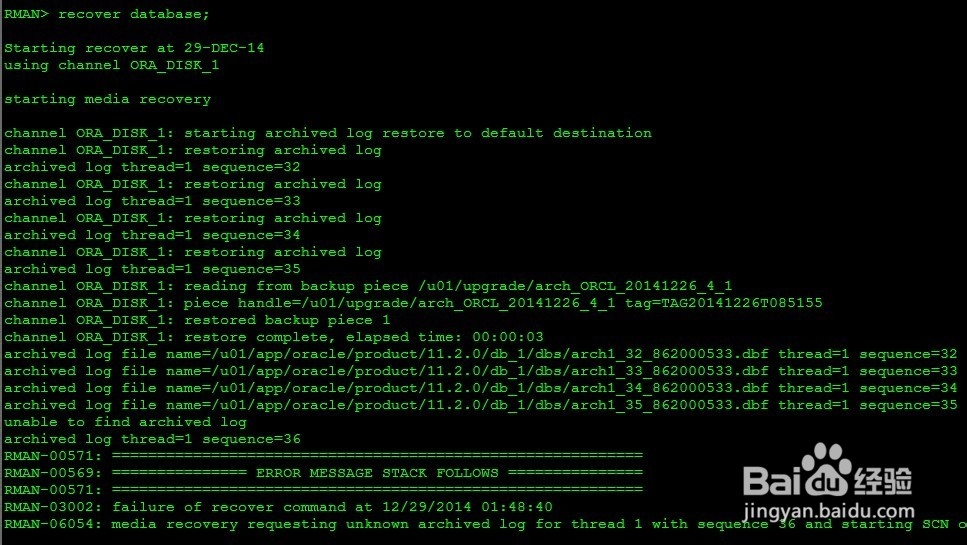
7:恢复数据文件
RMAN> recover database;
恢复到备份集最新点
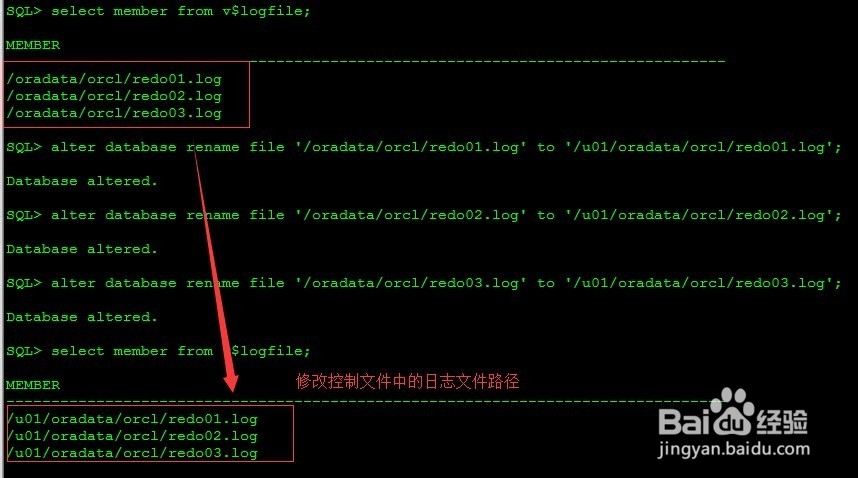
8:修改日志文件路径
数据文件还原恢复之后,日志文件没有,需要修改日志文件存放目录
alter database rename file '/oradata/orcl/redo01.log' to '/u01/oradata/orcl/redo01.log';
alter database rename file '/oradata/orcl/redo02.log' to '/u01/oradata/orcl/redo02.log';
alter database rename file '/oradata/orcl/redo03.log' to '/u01/oradata/orcl/redo03.log';
如果open resetlogs报错:ORA-00392 参考我的经验:resetlogs报错 ORA-00392
9:创建临时文件
1、修改控制文件中临时文件路径
SQL> alter database rename file '/oradata/orcl/temp01.dbf' to '/u01/oradata/orcl/temp01.dbf';
2、offline 临时文件
SQL> alter database tempfile '/u01/oradata/orcl/temp01.dbf' offline;
Database altered.
3、从原库中上传临时文件到修改目录
[oracle@oracle10g orcl]$ scp temp01.dbf 192.168.56.127:/u01/oradata/orcl
oracle@192.168.56.127's password:
temp01.dbf 100% 146MB 13.3MB/s 00:11
4、online 临时文件
SQL> alter database tempfile '/u01/oradata/orcl/temp01.dbf' online;
7、升级数据库
1:alter database open resetlogs upgrade;
2:
SQL> spool upgrade.log
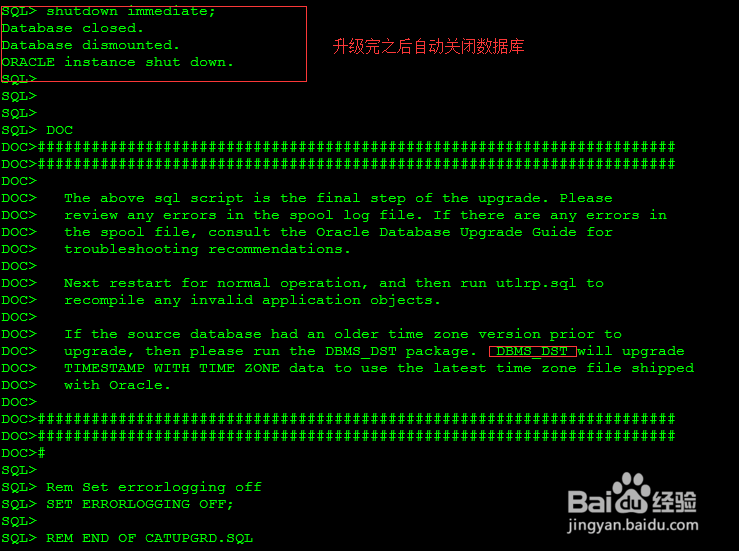
SQL> @?/rdbms/admin/catupgrd.sql
注意:如果open resetlogs报错:ORA-00392 参考我的经验:resetlogs报错 ORA-00392
8、升级后操作
1:创建spfiel文件
2:执行EXECUTE dbms_stats.gather_dictionary_stats;
3:重新编译
4:查看失效对象
5:运行升级后检查脚本
1:创建spfiel文件
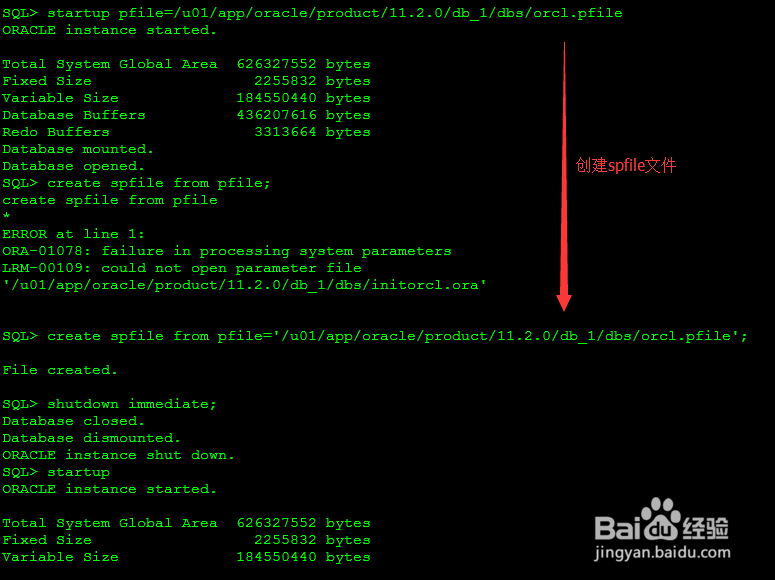
SQL> startup pfile=/u01/app/oracle/product/11.2.0/db_1/dbs/orcl.pfile
SQL> create spfile from pfile='/u01/app/oracle/product/11.2.0/db_1/dbs/orcl.pfile';
2:执行EXECUTE dbms_stats.gather_dictionary_stats;
SQL> exec dbms_stats.gather_dictionary_stats;
PL/SQL procedure successfully completed.
3:重新编译
SQL> @?/rdbms/admin/utlrp.sql;
4:查看失效对象
SQL> SELECT count(*) FROM dba_invalid_objects;
如果失效对象为升级之前的失效对象,升级过程中没有使对象失效
5:运行升级后检查脚本
SQL> @?/rdbms/admin/utlu112s.sql