css设置模态框如何显示在最上层
1、初始代码如下:
<html>
<head>
<title></title>
</head>
<style type="text/css">
.red{
width:100px;
height: 100px;
background: red;
position: absolute;
}
.yellow{
width: 200px;
height: 100px;
background: yellow;
position: absolute;
}
</style>
<body>
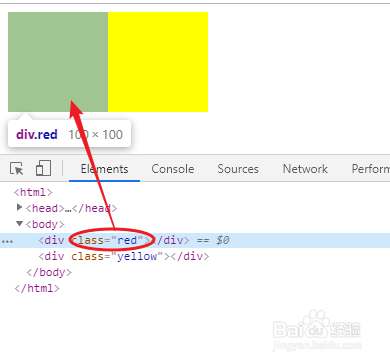
<div class="red"></div>
<div class="yellow"></div>
</body>
</html>
可以看出橙色的div明显在红色的div上面,现在使用z-index属性控制红色div在橙色div上面。
2、代码如下:
<html>
<head>
<title></title>
</head>
<style type="text/css">
.red{
width:100px;
height: 100px;
background: red;
position: absolute;
z-index: 11;
}
.yellow{
width: 200px;
height: 100px;
background: yellow;
position: absolute;
}
</style>
<body>
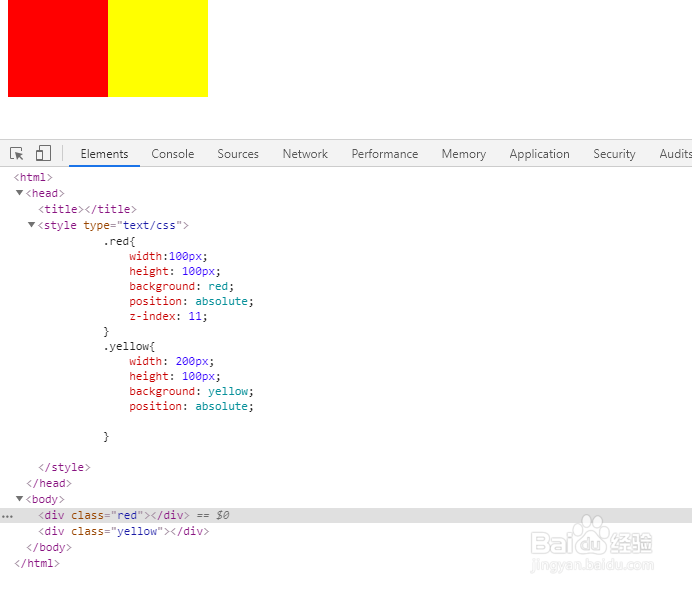
<div class="red"></div>
<div class="yellow"></div>
</body>
</html>
效果如下图:
声明:本网站引用、摘录或转载内容仅供网站访问者交流或参考,不代表本站立场,如存在版权或非法内容,请联系站长删除,联系邮箱:site.kefu@qq.com。
阅读量:193
阅读量:95
阅读量:180
阅读量:35
阅读量:113