给wordpress链接添加“nofollow”选项的方法
1、打开meta-boxes.php,通过Ctrl+F找到function link_xfn_meta_box($link),我们发现,控制友情关系的一段代码有着极高的相似性,见下面代码:
<label for="contact">
<input class="valinp" type="radio" name="friendship" value="contact" id="contact" <?php xfn_check('friendship', 'contact'); ?> /> <?php /* translators: xfn: http://gmpg.org/xfn/ */ _e('contact') ?>
</label>
<label for="acquaintance">
<input class="valinp" type="radio" name="friendship" value="acquaintance" id="acquaintance" <?php xfn_check('friendship', 'acquaintance'); ?> /> <?php /* translators: xfn: http://gmpg.org/xfn/ */ _e('acquaintance') ?>
</label>
<label for="friend">
<input class="valinp" type="radio" name="friendship" value="friend" id="friend" <?php xfn_check('friendship', 'friend'); ?> /> <?php /* translators: xfn: http://gmpg.org/xfn/ */ _e('friend') ?>
</label>
<label for="friendship">
<input name="friendship" type="radio" class="valinp" value="" id="friendship" <?php xfn_check('friendship'); ?> /> <?php /* translators: xfn: http://gmpg.org/xfn/ */ _e('none') ?>
</label>
这4段代码分别对应的是XFN关系的"偶有联系"、“熟人”“朋友”和“无"。
2、依葫芦画瓢,直接在对应“无”的代码下面,添上如下代码,就能成功添上nofollow选项。
<label for="nofollow">
<input class="valinp" type="radio" name="friendship" value="nofollow" id="nofollow" <?php xfn_check('friendship', 'nofollow'); ?> /> <?php /* translators: xfn: http://gmpg.org/xfn/ */ _e('nofollow') ?>
</label>
效果如下图:

3、同样的道理,如果想把nofollow添加在其他位置,比如职场关系、地理关系、家庭关系等,只需要找到其对应的代码,按着上面的方法,简单的“复制-修改”一下,添加在代码下面即可。如下图:

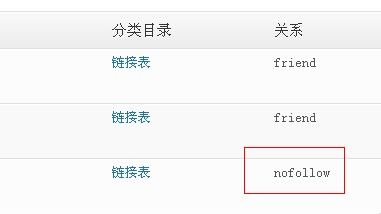
4、经过这么修改,以后我们要给一个友情链接添加上nofollow就十分方便了,而且添加后,在后台设置-链接表首页,也会有nofollow的关系提示,要找到带有nofollow属性的超链接也会十分快捷。
声明:本网站引用、摘录或转载内容仅供网站访问者交流或参考,不代表本站立场,如存在版权或非法内容,请联系站长删除,联系邮箱:site.kefu@qq.com。
阅读量:138
阅读量:151
阅读量:146
阅读量:173
阅读量:27