WebStorm引入样式路径及调试页面未授权解决
1、打开WebStrom开发工具,新建test.html文件,并在同个目录下放入
bootstrap4的文件夹,目录结构如下图
<title>Title</title>
</head>
<body>
<button class="bg-danger text-white">press me </button>
<script src="/bootstrap4.0dist/js/bootstrap.min.js"></script>
</body>
</html>
注意:实际生产环境用到的只有上面两个bootstrap相关的和jQuery.js和
proper.js文件,这两个文件要单独下载并引入。
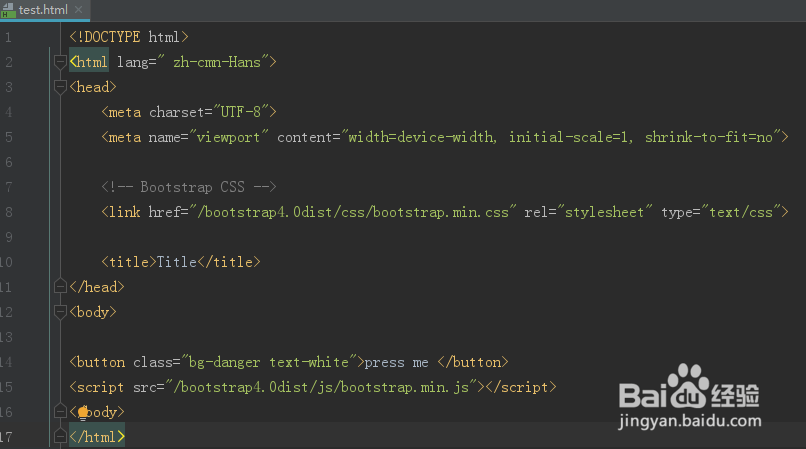
3、浏览器查看效果,并没有预期的效果,而是不加任何样式的按钮出现
<title>Title</title>
</head>
<body>
<button class="bg-danger text-white">press me </button>
<script src="bootstrap4.0dist/js/bootstrap.min.js"></script>
</body>
</html>
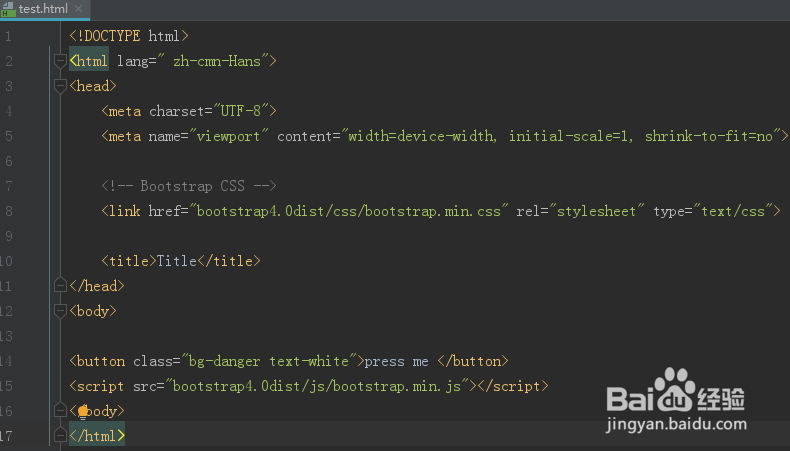
7、再打开浏览器访问就正常了,另外WebStrom不能引入上层目录的样式,这个也需要注意,当然可以通过修改配置来设置,但是并不建议这样做,因为整个工程看起来会比较混乱

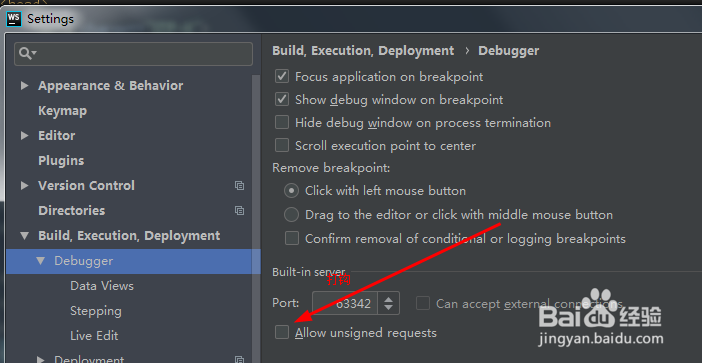
8、当多次访问时,编辑器可能会报
requested without authorization
这个可以通过设置
File--settings--Build, Execution,Deployment--Debugger
打钩allow unsigned requests
来解决
声明:本网站引用、摘录或转载内容仅供网站访问者交流或参考,不代表本站立场,如存在版权或非法内容,请联系站长删除,联系邮箱:site.kefu@qq.com。
阅读量:88
阅读量:193
阅读量:120
阅读量:85
阅读量:109