怎样用EXCEL制作彩-票号码生成器
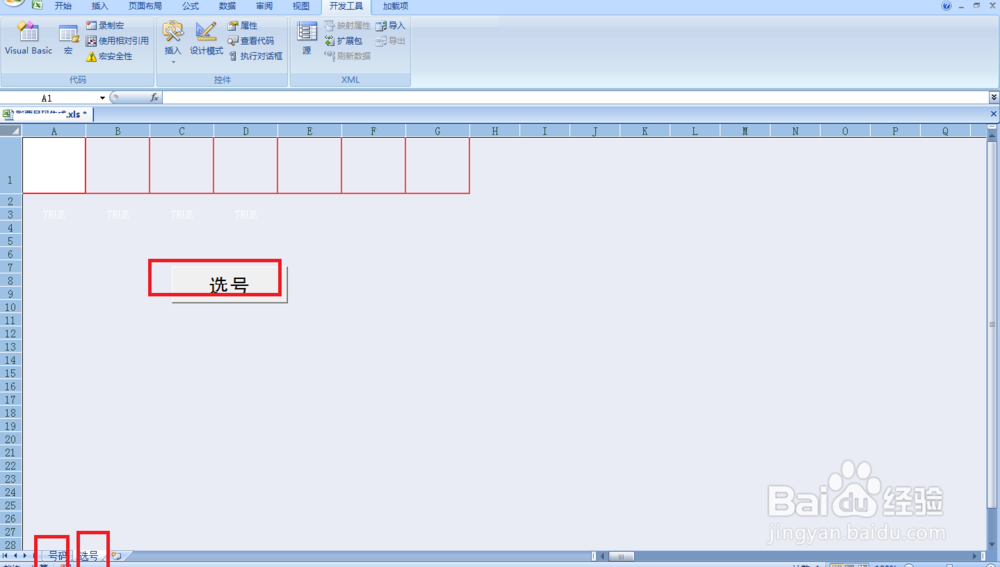
1、准备工作:在新建的EXCEL工作表中命名两个工作表分别为:号码和选号——按图所示设置选号表格的属性(白底无边框)——插入一个文本框输入选号文字。
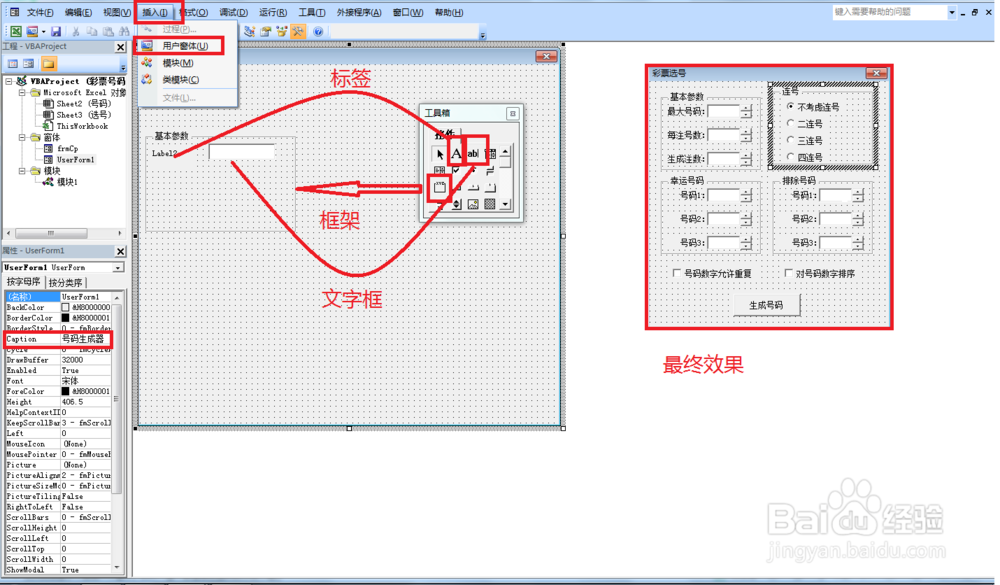
2、首先打开VBA编辑器(同时按alt+F11)——点击插入——窗体,把窗体拖拉变大一些并修改窗体的caption属性,如修改成“号码生成器”——插入框架并修改窗体的caption属性,如基本参数——接着在第一个框架插入标签和文字框或者选项按钮。插入的窗体内容就按最张效果图那样插入。
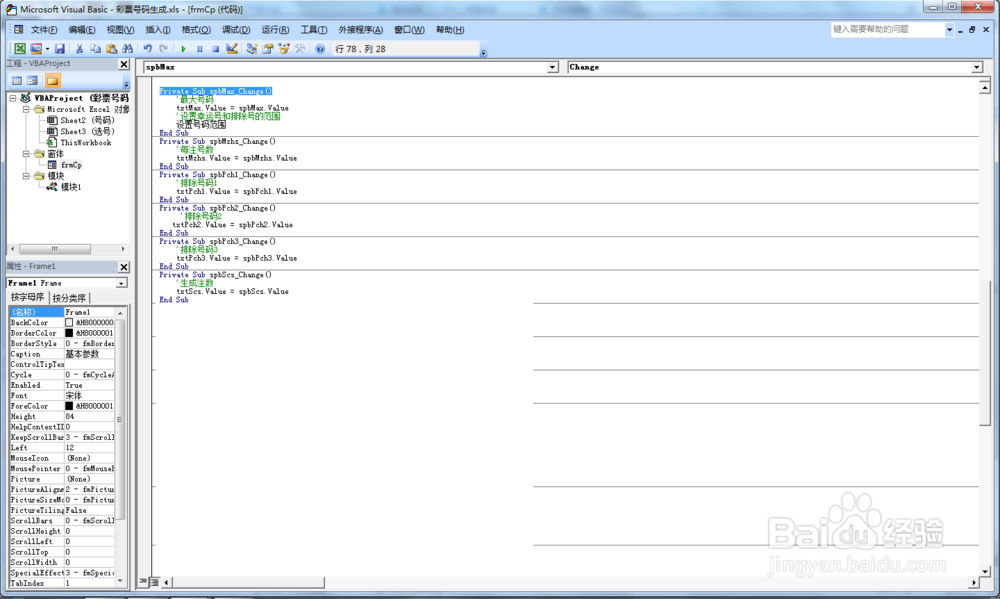
3、第二,设置基本参数中每个文本框输入值的VBA代码:
Private Sub spbMax_Change()
'最大号码
txtMax.Value = spbMax.Value
'设置幸运号和排除号的范围
设置号码范围
End Sub
Private Sub spbMzhs_Change()
'每注号数
txtMzhs.Value = spbMzhs.Value
End Sub
Private Sub spbScs_Change()
'生成注数
txtScs.Value = spbScs.Value
End Sub
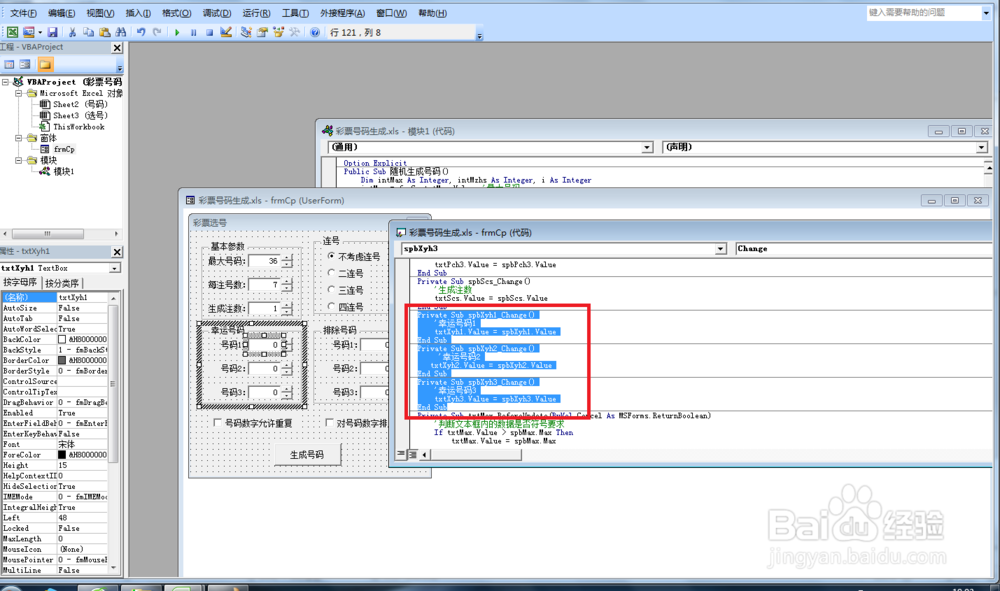
4、第三,设置幸运号框架中选项按钮值的输入VBA代码:
Private Sub spbXyh1_Change()
'幸运号码1
txtXyh1.Value = spbXyh1.Value
End Sub
Private Sub spbXyh2_Change()
'幸运号码2
txtXyh2.Value = spbXyh2.Value
End Sub
Private Sub spbXyh3_Change()
'幸运号码3
txtXyh3.Value = spbXyh3.Value
End Sub
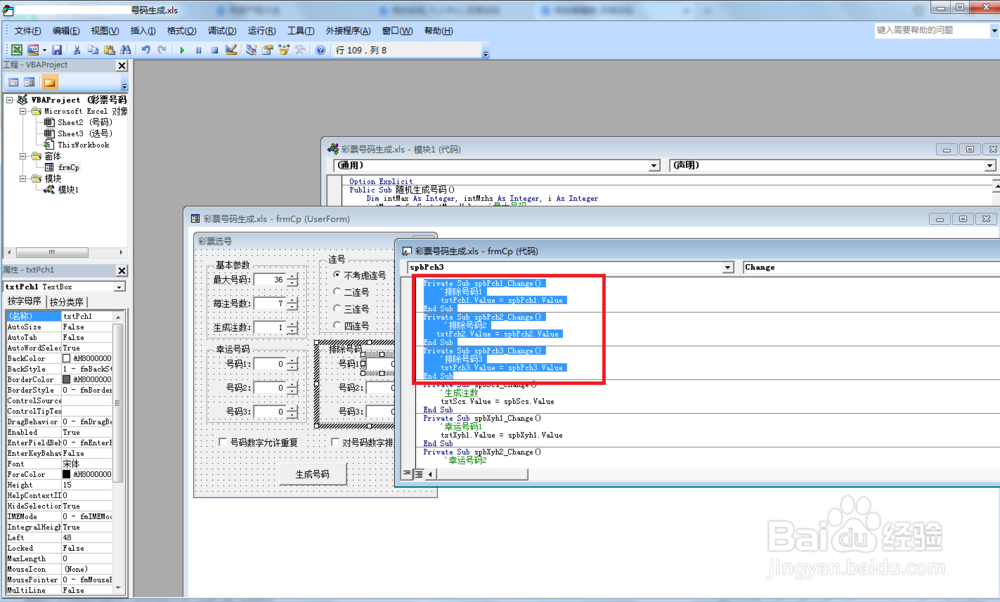
5、第四,设置排除号码文本框的数值输入VBA代码:
Private Sub spbPch1_Change()
'排除号码1
txtPch1.Value = spbPch1.Value
End Sub
Private Sub spbPch2_Change()
'排除号码2
txtPch2.Value = spbPch2.Value
End Sub
Private Sub spbPch3_Change()
'排除号码3
txtPch3.Value = spbPch3.Value
End Sub
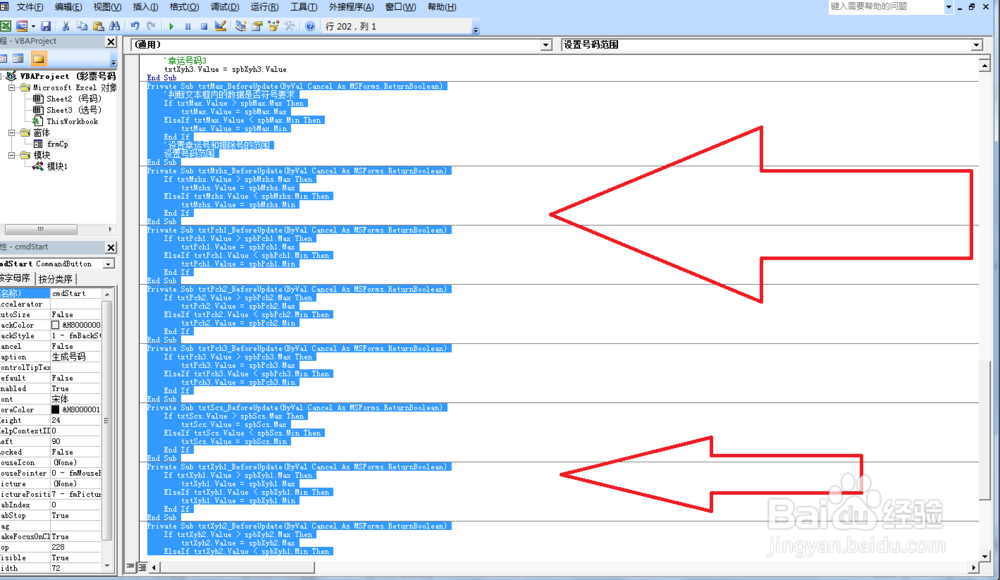
6、第五,设置文本框数据是否符合要求及设置号码范围的VBA代码:
Private Sub txtMax_BeforeUpdate(ByVal Cancel As MSForms.ReturnBoolean)
'判断文本框内的数据是否符号要求
If txtMax.Value > spbMax.Max Then
txtMax.Value = spbMax.Max
ElseIf txtMax.Value < spbMax.Min Then
txtMax.Value = spbMax.Min
End If
'设置幸运号和排除号的范围
设置号码范围
End Sub
Private Sub txtMzhs_BeforeUpdate(ByVal Cancel As MSForms.ReturnBoolean)
If txtMzhs.Value > spbMzhs.Max Then
txtMzhs.Value = spbMzhs.Max
ElseIf txtMzhs.Value < spbMzhs.Min Then
txtMzhs.Value = spbMzhs.Min
End If
End Sub
Private Sub txtPch1_BeforeUpdate(ByVal Cancel As MSForms.ReturnBoolean)
If txtPch1.Value > spbPch1.Max Then
txtPch1.Value = spbPch1.Max
ElseIf txtPch1.Value < spbPch1.Min Then
txtPch1.Value = spbPch1.Min
End If
End Sub
Private Sub txtPch2_BeforeUpdate(ByVal Cancel As MSForms.ReturnBoolean)
If txtPch2.Value > spbPch2.Max Then
txtPch2.Value = spbPch2.Max
ElseIf txtPch2.Value < spbPch2.Min Then
txtPch2.Value = spbPch2.Min
End If
End Sub
Private Sub txtPch3_BeforeUpdate(ByVal Cancel As MSForms.ReturnBoolean)
If txtPch3.Value > spbPch3.Max Then
txtPch3.Value = spbPch3.Max
ElseIf txtPch3.Value < spbPch3.Min Then
txtPch3.Value = spbPch3.Min
End If
End Sub
Private Sub txtScs_BeforeUpdate(ByVal Cancel As MSForms.ReturnBoolean)
If txtScs.Value > spbScs.Max Then
txtScs.Value = spbScs.Max
ElseIf txtScs.Value < spbScs.Min Then
txtScs.Value = spbScs.Min
End If
End Sub
Private Sub txtXyh1_BeforeUpdate(ByVal Cancel As MSForms.ReturnBoolean)
If txtXyh1.Value > spbXyh1.Max Then
txtXyh1.Value = spbXyh1.Max
ElseIf txtXyh1.Value < spbXyh1.Min Then
txtXyh1.Value = spbXyh1.Min
End If
End Sub
Private Sub txtXyh2_BeforeUpdate(ByVal Cancel As MSForms.ReturnBoolean)
If txtXyh2.Value > spbXyh2.Max Then
txtXyh2.Value = spbXyh2.Max
ElseIf txtXyh2.Value < spbXyh1.Min Then
txtXyh2.Value = spbXyh2.Min
End If
End Sub
Private Sub txtXyh3_BeforeUpdate(ByVal Cancel As MSForms.ReturnBoolean)
If txtXyh3.Value > spbXyh3.Max Then
txtXyh3.Value = spbXyh3.Max
ElseIf txtXyh3.Value < spbXyh3.Min Then
txtXyh3.Value = spbXyh3.Min
End If
End Sub
Sub 设置号码范围()
'设置幸运号和排除号的范围
spbXyh1.Max = txtMax.Value
spbXyh2.Max = txtMax.Value
spbXyh3.Max = txtMax.Value
spbPch1.Max = txtMax.Value
spbPch2.Max = txtMax.Value
spbPch3.Max = txtMax.Value
End Sub
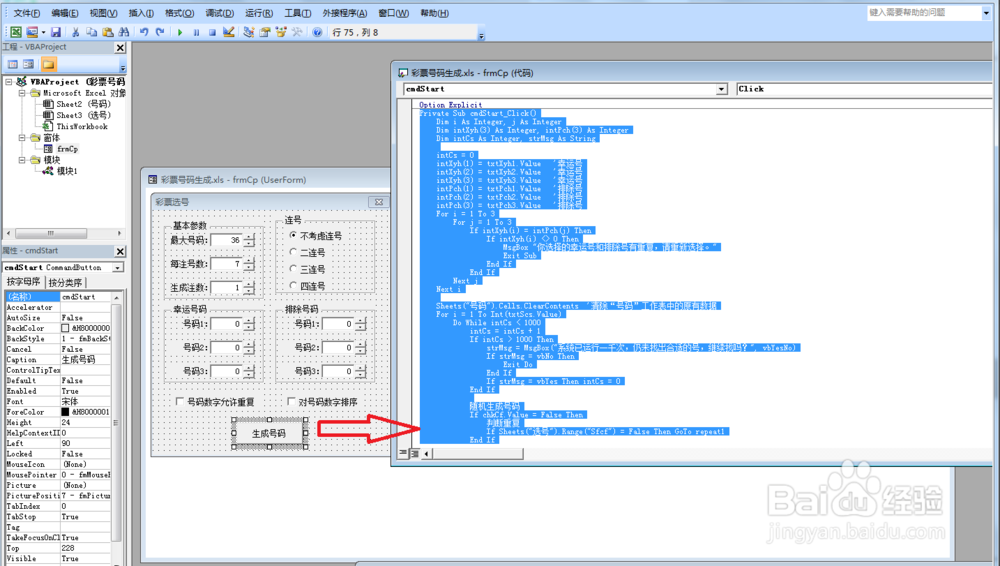
7、第六,设置号码生成按钮的VBA代码:
Private Sub cmdStart_Click()
Dim i As Integer, j As Integer
Dim intXyh(3) As Integer, intPch(3) As Integer
Dim intCs As Integer, strMsg As String
intCs = 0
intXyh(1) = txtXyh1.Value '幸运号
intXyh(2) = txtXyh2.Value '幸运号
intXyh(3) = txtXyh3.Value '幸运号
intPch(1) = txtPch1.Value '排除号
intPch(2) = txtPch2.Value '排除号
intPch(3) = txtPch3.Value '排除号
For i = 1 To 3
For j = 1 To 3
If intXyh(i) = intPch(j) Then
If intXyh(i) <> 0 Then
MsgBox "你选择的幸运号和排除号有重复,请重新选择。"
Exit Sub
End If
End If
Next j
Next i
Sheets("号码").Cells.ClearContents '清除“号码”工作表中的原有数据
For i = 1 To Int(txtScs.Value)
Do While intCs < 1000
intCs = intCs + 1
If intCs > 1000 Then
strMsg = MsgBox("系统已运行一千次,仍未找出合适的号,继续找吗?", vbYesNo)
If strMsg = vbNo Then
Exit Do
End If
If strMsg = vbYes Then intCs = 0
End If
随机生成号码
If chkCf.Value = False Then
判断重复
If Sheets("选号").Range("Sfcf") = False Then GoTo repeat1
End If
判断幸运号
If Sheets("选号").Range("Xyh") = False Then GoTo repeat1
判断排除号
If Sheets("选号").Range("Pch") = False Then GoTo repeat1
If chkPx.Value = True Then
排序
End If
连号
If Sheets("选号").Range("Lianhao") = False Then GoTo repeat1
Me.Hide
Sheets("选号").Activate
strMsg = MsgBox("第" & i & "注号码生成了,你可以选择保存号码到表格," & vbCrLf _
& "或重新生成该注号码。是否保存?", vbYesNo, "保存号码")
If strMsg = vbYes Then
'保存到表格中
Sheets("选号").Select
Sheets("号码").Cells(i, 1) = Cells(1, 1)
Sheets("号码").Cells(i, 2) = Cells(1, 2)
Sheets("号码").Cells(i, 3) = Cells(1, 3)
Sheets("号码").Cells(i, 4) = Cells(1, 4)
Sheets("号码").Cells(i, 5) = Cells(1, 5)
Sheets("号码").Cells(i, 6) = Cells(1, 6)
Sheets("号码").Cells(i, 7) = Cells(1, 7)
Exit Do
End If
repeat1:
Loop
Next
Sheets("号码").Activate
End Sub
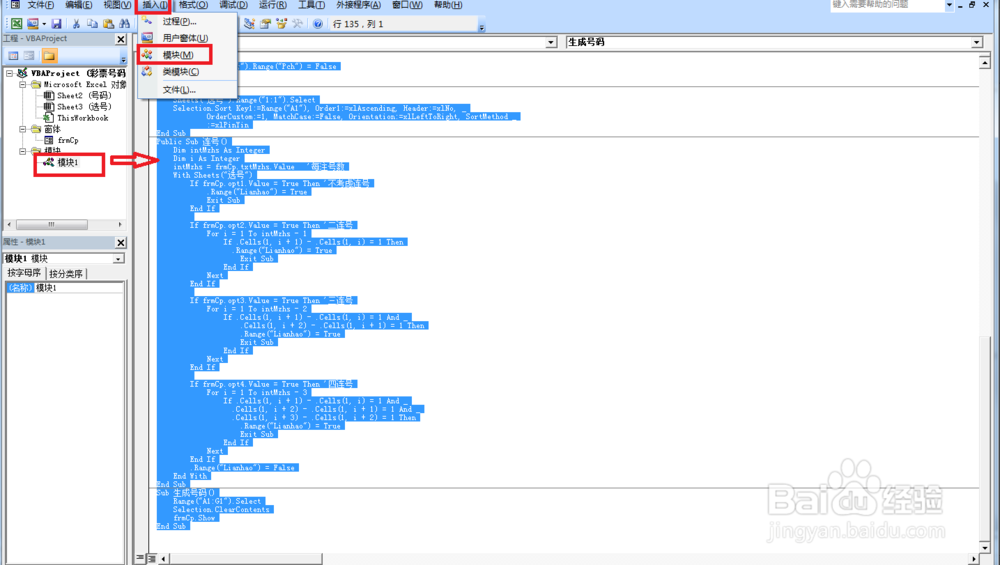
8、第七,接着点击插入——模块——然后在模块那里输入如下VBA代码:
Public Sub 随机生成号码()
Dim intMax As Integer, intMzhs As Integer, i As Integer
intMax = frmCp.txtMax.Value '最大号码
intMzhs = frmCp.txtMzhs.Value '每注号数
For i = 1 To intMzhs
Randomize
Sheets("选号").Cells(1, i) = Int(intMax * Rnd + 1)
Next
End Sub
Public Sub 判断重复()
Dim intMzhs As Integer, i As Integer, j As Integer
intMzhs = frmCp.txtMzhs.Value '每注号数
For i = 1 To intMzhs - 1
For j = i + 1 To intMzhs
If Sheets("选号").Cells(1, i) = Sheets("选号").Cells(1, j) Then
Sheets("选号").Range("Sfcf") = False
Exit Sub
End If
Next j
Next i
Sheets("选号").Range("Sfcf") = True
End Sub
Public Sub 判断幸运号()
Dim intXyh(3) As Integer, intMzhs As Integer
Dim x(3) As Boolean, i As Integer, intTemp As Integer
Dim j As Integer
intMzhs = frmCp.txtMzhs.Value '每注号数
intXyh(1) = frmCp.txtXyh1.Value '幸运号
intXyh(2) = frmCp.txtXyh2.Value '幸运号
intXyh(3) = frmCp.txtXyh3.Value '幸运号
If intXyh(1) = 0 And intXyh(2) = 0 And intXyh(3) = 0 Then
Sheets("选号").Range("Xyh") = True
Exit Sub
End If
For i = 1 To 3
If intXyh(i) = 0 Then x(i) = True
Next
For i = 1 To intMzhs
intTemp = Sheets("选号").Cells(1, i)
For j = 1 To 3
If intXyh(j) - intTemp = 0 Then x(j) = True
Next j
If x(1) = True And x(2) = True And x(3) = True Then
Sheets("选号").Range("Xyh") = True
Exit Sub
End If
Next
Sheets("选号").Range("Xyh") = False
End Sub
Public Sub 判断排除号()
Dim intPch(3) As Integer, intMzhs As Integer
Dim x(3) As Boolean, i As Integer, intTemp As Integer
Dim j As Integer
For i = 1 To 3
x(i) = True
Next
intMzhs = frmCp.txtMzhs.Value '每注号数
intPch(1) = frmCp.txtPch1.Value '排除号
intPch(2) = frmCp.txtPch2.Value '排除号
intPch(3) = frmCp.txtPch3.Value '排除号
If intPch(1) = 0 And intPch(2) = 0 And intPch(3) = 0 Then
Sheets("选号").Range("Pch") = True
Exit Sub
End If
For i = 1 To 3
If intPch(i) = 0 Then x(i) = True
Next
For i = 1 To intMzhs
intTemp = Sheets("选号").Cells(1, i)
For j = 1 To 3
If intPch(j) - intTemp = 0 Then x(j) = False
Next j
Next
If x(1) = True And x(2) = True And x(3) = True Then
Sheets("选号").Range("Pch") = True
Else
Sheets("选号").Range("Pch") = False
End If
End Sub
Public Sub 排序()
Sheets("选号").Range("1:1").Select
Selection.Sort Key1:=Range("A1"), Order1:=xlAscending, Header:=xlNo, _
OrderCustom:=1, MatchCase:=False, Orientation:=xlLeftToRight, SortMethod _
:=xlPinYin
End Sub
Public Sub 连号()
Dim intMzhs As Integer
Dim i As Integer
intMzhs = frmCp.txtMzhs.Value '每注号数
With Sheets("选号")
If frmCp.opt1.Value = True Then '不考虑连号
.Range("Lianhao") = True
Exit Sub
End If
If frmCp.opt2.Value = True Then '二连号
For i = 1 To intMzhs - 1
If .Cells(1, i + 1) - .Cells(1, i) = 1 Then
.Range("Lianhao") = True
Exit Sub
End If
Next
End If
If frmCp.opt3.Value = True Then '三连号
For i = 1 To intMzhs - 2
If .Cells(1, i + 1) - .Cells(1, i) = 1 And _
.Cells(1, i + 2) - .Cells(1, i + 1) = 1 Then
.Range("Lianhao") = True
Exit Sub
End If
Next
End If
If frmCp.opt4.Value = True Then '四连号
For i = 1 To intMzhs - 3
If .Cells(1, i + 1) - .Cells(1, i) = 1 And _
.Cells(1, i + 2) - .Cells(1, i + 1) = 1 And _
.Cells(1, i + 3) - .Cells(1, i + 2) = 1 Then
.Range("Lianhao") = True
Exit Sub
End If
Next
End If
.Range("Lianhao") = False
End With
End Sub
Sub 生成号码()
Range("A1:G1").Select
Selection.ClearContents
frmCp.Show
End Sub
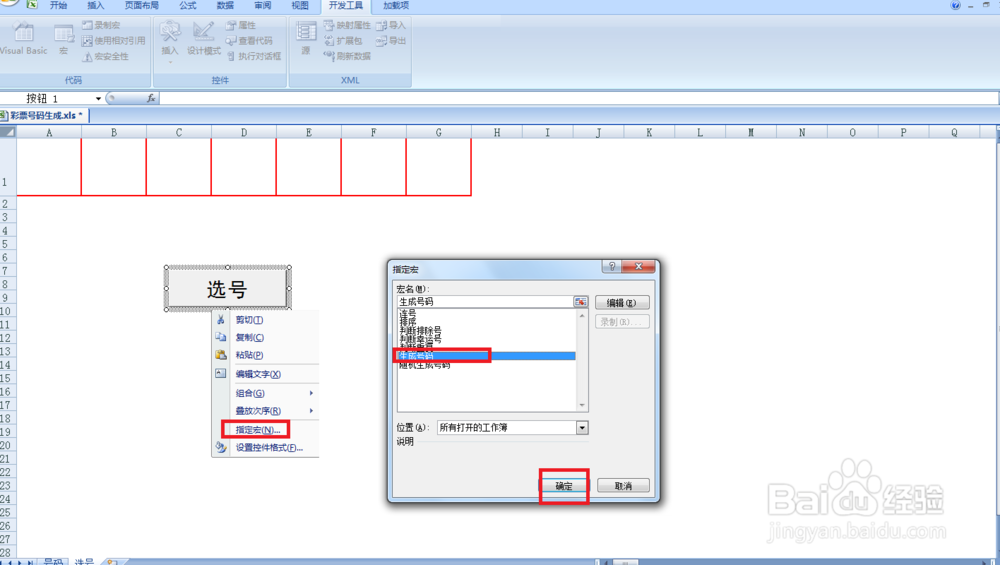
9、最后,右击选号表格的选号文本框——指定宏——选择生成码号,然后点击就可以自动生成号码了。